Should You Update Your Website or Completely Redesign It?
By Joe Fredrick • August 29, 2026

14 Minute Read
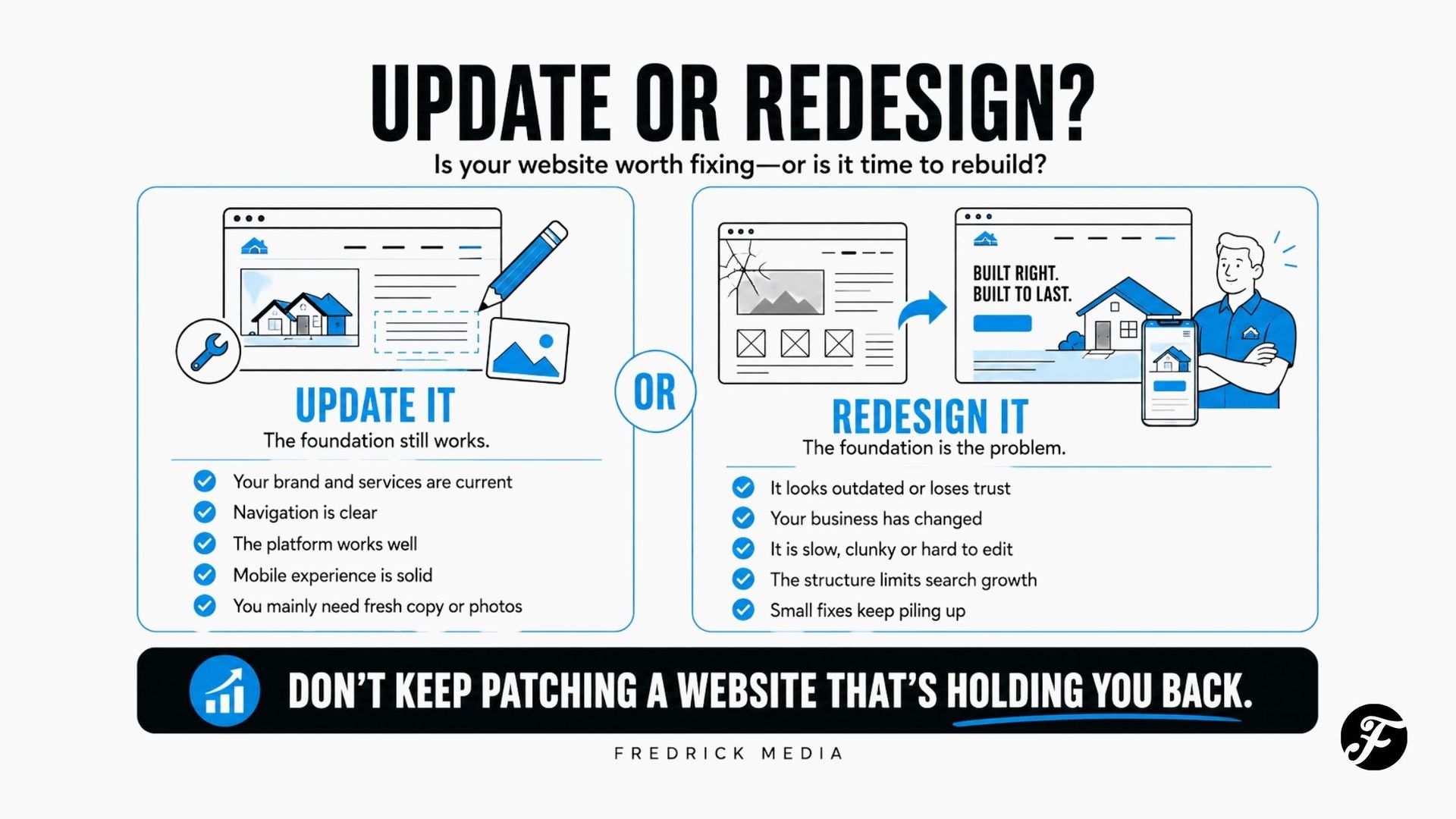
A few website updates may be enough when the site is already clear, professional, mobile-friendly, easy to manage, and organized around the business you run today.
But when the copy, structure, mobile experience, design, search foundation, and platform all need attention, a complete redesign or rebuild is usually the smarter investment. Small fixes may improve individual symptoms. Rebuilding gives you the opportunity to solve the connected problems together and create a stronger foundation for the next several years.
There is also a middle option: a focused refresh. That means keeping the current platform and most of the structure while substantially improving the homepage, navigation, copy, visual style, and strongest service pages. A refresh can work when the site has good bones. It cannot fully correct a restrictive platform, confusing page structure, weak mobile foundation, or years of disconnected patches.
Don't base the decision only on age. A seven-year-old site may need a few careful improvements. A two-year-old site may deserve a rebuild if it was poorly planned from the beginning.
The simplest rule is:
→ Update isolated problems. Refresh a sound foundation that feels tired. Rebuild when the foundation itself is holding the business back.
Quick Decision Table
| Your situation | Best starting point | Why |
|---|---|---|
| Information is mostly accurate, but a few details or photos are old | Update | The site’s main structure still works |
| The site works well, but the homepage and visual style feel dated | Refresh | Focused changes may restore clarity and confidence |
| The business has changed significantly | Redesign | The site may be organized around an outdated version of the company |
| Mobile visitors struggle to read, navigate, call, or submit forms | Redesign | The problem affects the entire customer experience |
| Several important services are buried on one general page | Redesign | The site needs a stronger structure, not just new wording |
| The platform is unsupported, difficult to edit, or controlled by someone else | Rebuild on a managed platform | Continuing to patch it creates more risk and rework |
| The website looks acceptable but produces weak inquiries | Diagnose first | The cause may be traffic, messaging, trust, usability, or tracking |
| You dislike the colors but customers can easily understand and use the site | Update | A complete rebuild would probably be unnecessary |
If several redesign conditions apply, another round of surface-level fixes may only delay the work the site truly needs. Fixing five connected problems separately can also cost more time and money than rebuilding the foundation once.
What Counts as a Website Update?
An update changes a specific part of the current website without reconsidering the whole system.
Common updates include:
- Replacing old team members, hours, or contact information
- Adding recent project photos
- Revising a service description
- Changing a button or contact form
- Adding a testimonial or credential
- Updating pricing or financing information
- Improving a page title or meta description
- Fixing a broken link
- Adding a new frequently asked question
- Replacing one outdated homepage section
These changes make sense when the current navigation, page structure, platform, and design still support the business.
For example, imagine a Fox Valley landscaper with a clear five-page website that works well on phones. The company recently added outdoor lighting and has a year of better project photography. Adding a useful lighting section or page, replacing old photos, and updating the inquiry form may be all it needs.
There is no reason to rebuild a good website simply because new information exists.
What Is a Website Refresh?
A refresh is more substantial than routine maintenance but less disruptive than a complete rebuild. It improves how the existing site looks, reads, and guides visitors while preserving its basic platform or structure.
A refresh might include:
- Rewriting the homepage
- Simplifying the navigation
- Reorganizing sections on important pages
- Updating fonts, colors, buttons, and spacing
- Replacing stock photos with real business photography
- Strengthening calls to action
- Improving mobile layouts
- Adding reviews, projects, and trust signals
- Revising the header and footer
- Creating one or two important service pages
This option fits a site that has good bones but no longer feels polished or persuasive.
An established electrician, for example, may have accurate service pages and a manageable platform. If the homepage opens with a vague welcome message, the design feels dark and crowded, and the best reviews are hidden, a focused refresh could make a noticeable difference without rebuilding every URL.
The limitation is that a refresh must work inside the decisions already made. If the navigation, page count, mobile framework, platform, or content strategy is wrong, the project can become an expensive attempt to decorate around the real problem.
What Counts as a Complete Website Redesign?
A redesign rethinks the website as a whole. It may include a new platform, page structure, navigation, messaging, copy, design system, forms, and search foundation.
A complete redesign is usually appropriate when the current site no longer provides a dependable base for improvement.
That often includes situations where:
- The website does not work properly on phones
- Visitors cannot quickly understand what the business does
- The site reflects services, staff, or positioning that are no longer accurate
- Several audiences or services are crammed into a confusing structure
- The platform limits necessary changes
- The owner cannot access or control essential accounts
- Important pages are slow, broken, or difficult to use
- The design visibly weakens trust
- Forms fail or inquiries go to the wrong place
- Search visibility requires a more useful service and location structure
- Making one change regularly breaks something else
- The site has been repeatedly patched without solving its central problems
A redesign is not just a new coat of paint. It should correct the reasons the old website stopped serving the business.
Why Rebuilding Is Often Better Than Continuing to Patch
Website problems rarely stay neatly separated.
An unclear homepage may be connected to weak service pages. Weak service pages may be connected to poor navigation. Poor navigation may come from a platform or template that was never planned around the business. Mobile problems may appear on every page because the entire layout system is outdated.
When several problems share the same foundation, rebuilding lets you solve them as one coordinated project.
A thoughtful rebuild can:
- Organize the website around the services you most want to sell
- Rewrite the copy around the questions customers ask before calling
- Create clear paths for different services and audiences
- Design the mobile experience correctly from the beginning
- Replace scattered buttons with consistent calls to action
- Improve forms so inquiries contain more useful information
- Build in real reviews, projects, credentials, and local proof
- Create a cleaner foundation for service pages, location pages, and future SEO
- Preserve useful URLs and search value through careful planning and redirects
- Give the business a website that finally matches the quality of its real work
Patching usually asks, “How can we make this old section better?” A rebuild asks the more valuable question: “What should this website do for the business now?”
That does not mean everything old should be discarded. Strong copy, photos, reviews, URLs, analytics, and search visibility can be carried into the new site. The goal is to preserve the value while replacing the limitations.
The 7-Part Update-or-Redesign Scorecard
Review each area honestly. Choose the description that best matches your website and record the points.
| Area | 0 points: Keep | 1 point: Improve | 2 points: Rebuild |
|---|---|---|---|
| Business fit | Accurately reflects the business today | Several messages or services are outdated | Built around an old offer, audience, or company direction |
| Mobile experience | Easy to read, navigate, call, and submit | A few layouts or buttons need work | Crowded, tiny, broken, or frustrating across the site |
| Structure | Visitors can quickly find what they need | Navigation or a few pages need reorganizing | Services and customer paths are fundamentally confusing |
| Copy and clarity | Clearly explains what, where, why, and next step | Important sections are vague or incomplete | Most pages need to be rewritten |
| Trust and design | Looks credible and shows convincing proof | Styling and proof feel dated | Appearance actively makes the business feel less established |
| Platform and control | Secure, supported, accessible, and manageable | Some technical limitations or access issues | Unsupported, locked down, unreliable, or controlled by someone else |
| Search foundation | Useful pages, clean URLs, and sound basics | Several pages or elements need optimization | Thin, duplicated, disorganized, or missing the pages the business needs |
How to read your score
- 0–3 points: Update the current site. The foundation appears sound, so concentrate on the few weak areas.
- 4–6 points: Consider a focused refresh. Keep what works, but make the improvements as one coordinated project.
- 7–14 points: Strongly consider a redesign. Several problems are beginning to depend on one another, making isolated fixes less practical.
This is a decision aid, not a diagnosis. A single serious issue—such as losing control of the platform or having a broken mobile experience—can justify a rebuild even when the total score is lower.
1. Does the Website Still Match the Business?
Start with accuracy, not aesthetics.
Ask:
- Are the most profitable services easy to find?
- Does the site name the customers and communities you actually serve?
- Are former services still being promoted?
- Does the business look as capable online as it is in real life?
- Does the site support the type of project you want more of?
Many businesses slowly outgrow their websites. A contractor may begin with repairs, then grow into larger remodeling projects. A lawn company may add landscape construction, snow service, and commercial work. If the original website is still arranged around the first version of the business, new paragraphs may not be enough.
When the business has changed more than the site, a redesign often creates the cleanest path forward.
2. What Happens on a Phone?
Do not judge the site only from the computer in your office. Open it on a phone and try to use it as a new customer would.
Check whether you can:
- Understand the business within a few seconds
- Read the text without zooming
- Tap the menu and buttons comfortably
- Find the phone number or estimate form
- View project photos without awkward cropping
- Complete and submit the form
- Return to the previous page without getting lost
A few mobile spacing problems can be updated. A site that was never designed for modern phones usually needs deeper work.
Google recommends providing a strong overall page experience, but there is no single score that guarantees rankings. Mobile usability should be improved because it helps real customers use the website—not because someone promises one technical adjustment will move the business to the top of Google.
3. Can Customers Find the Right Information?
Good navigation follows the customer’s questions.
A service-business visitor usually wants to know:
- Do you provide the service I need?
- Do you work in my area?
- Can I trust you?
- What does the process look like?
- How do I get an estimate or start a conversation?
If this information exists but is slightly buried, navigation and page updates may solve the problem. If every service is compressed into a few sentences on the homepage, the site may need a new structure.
The article on how many pages a small business website should have can help you decide whether the current site has enough room to do its job. More pages are not automatically better, but important services need enough space to answer meaningful customer questions.
4. Does the Copy Make Choosing You Easier?
An attractive website can still underperform when its words are vague.
Common examples include:
- “Welcome to our website” instead of a clear statement of service and location
- “Quality you can trust” without proof
- A long company history before explaining what the company does
- Technical descriptions that customers do not understand
- Calls to action such as “Submit” or “Learn More” with no clear outcome
- No explanation of what happens after someone contacts the company
If only the homepage opening and calls to action are weak, update them. If nearly every page requires translation from company-centered language into customer-centered answers, include full copywriting in the redesign.
Changing the colors will not solve a message problem.
5. Does the Website Build Trust?
Customers often compare several local businesses before calling. Your site should help them verify that the company is real, capable, and suitable for the job.
Look for:
- Recent, genuine reviews
- Real photos of the owner, team, work, equipment, or location
- Clear experience and qualifications
- Relevant project examples
- Licenses, certifications, memberships, or warranties when applicable
- A local phone number and clear service area
- A real company story
- Consistent business information
- A professional, current visual presentation
Missing proof can often be added. But if the site’s design, layout, imagery, and wording all create doubt, a coordinated redesign will usually be more effective than adding a row of testimonials to the bottom.
6. Do You Control the Website and Essential Accounts?
Before investing in improvements, confirm who controls:
- The domain registration
- Domain name system settings
- Website platform
- Hosting or platform subscription
- Business email
- Google Business Profile
- Google Analytics
- Google Search Console
- Google Ads account
- Form-notification email address
- Original photography and logo files
The business should own or have appropriate administrative access to its essential accounts. If a former employee, developer, or agency is the only person with access, resolve that before starting a major project.
A difficult platform does not always require a redesign. If it is secure, supported, and capable of doing what the business needs, keeping it may be sensible. If it prevents basic improvements or leaves the business dependent on an unavailable provider, rebuilding on a manageable platform may be the safer long-term choice.
7. Is the Search Foundation Worth Keeping?
Do not erase a website that already earns valuable search traffic without understanding what is working.
Before redesigning, review:
- Which pages receive organic visits
- Which searches bring impressions and clicks
- Which pages attract links
- Which URLs appear in local results
- Which forms and phone calls turn into qualified leads
- Whether old pages have meaningful authority or history
A careful redesign preserves useful URLs where possible and creates redirects when a page address must change. It also checks page titles, headings, internal links, image text alternatives, forms, tracking, and indexing after launch.
If the current site has strong pages, keep or improve them. A redesign should not casually throw away results the business has already earned.
Do Low Leads Automatically Mean You Need a Redesign?
No.
A website cannot convert visitors who never arrive, and traffic alone does not guarantee the right audience.
Weak inquiry volume might be caused by:
- Too little visibility
- Rankings for irrelevant searches
- Ads aimed at the wrong audience
- An unclear offer
- Weak proof
- A confusing mobile experience
- A broken form or phone link
- Slow follow-up after inquiries
- Seasonal demand
- Poor tracking
Test the basics before blaming the entire website:
- Submit every form and confirm the message arrives.
- Tap every phone number on a mobile device.
- Review traffic and search queries.
- Compare inquiry quality, not just the number of visits.
- Ask recent customers what information they needed before calling.
- Review the site beside two strong local competitors.
If the site receives relevant visitors but consistently fails to help them understand, trust, or contact the business, a redesign becomes a stronger possibility.
When a Small Update Is the Smarter Investment
Choose updates when:
- The website already fits the brand and business
- Important pages receive useful traffic
- Mobile usability is strong
- The platform is dependable
- The page structure makes sense
- The problems can be listed precisely
- The budget is better spent on photography, content, reviews, or visibility
For example, a remodeler with a solid website may gain more from documenting five recent projects and adding them to the site than from changing every font and background color.
Do not rebuild out of boredom. Improve the part that is actually limiting the next customer decision.
When a Redesign Is the Smarter Investment
Choose a redesign when:
- The site undersells an established business
- Several important problems share the same structural cause
- The current platform blocks progress
- The company has outgrown its original services or audience
- Mobile use is poor across the site
- Most copy and imagery need replacement
- The website is difficult to trust or use
- Search and growth goals require a clearer service structure
- Repeated small fixes have produced a cluttered result
At that point, continuing to patch the site may cost less today but create more rework over the next several years.
Why I Build Small Business Websites on Duda
When I recommend rebuilding a website, I usually rebuild it on Duda. The platform gives me the design flexibility to create a website around the individual business while giving the owner a dependable, managed foundation after launch.
The platform alone does not make a website effective. Clear strategy, useful copy, thoughtful page structure, real proof, professional design, and ongoing attention still matter. Duda simply gives me a strong system for bringing those pieces together without asking a busy business owner to become a website technician.
Designed for desktop, tablet, and mobile
Duda provides responsive design controls that allow each page to be planned for different screen sizes. That matters because a layout that looks impressive on a large monitor may still be frustrating on a phone.
During a rebuild, I can intentionally organize mobile content, spacing, images, menus, buttons, and forms instead of hoping the desktop version shrinks gracefully.
Managed hosting, security, and backups
Duda websites use managed hosting on Amazon Web Services and include a global content delivery network, SSL security, platform maintenance, and site backups. This removes much of the technical upkeep associated with maintaining separate hosting, software, themes, and plugins.
No platform eliminates every possible issue, but fewer disconnected components mean fewer things for a small business owner to monitor.
A cleaner search foundation
Duda provides controls for page titles, meta descriptions, headings, URLs, redirects, image alt text, schema, and other on-page search elements. It also includes performance and page-speed optimizations.
Those tools do not guarantee rankings. They give the website a sound technical base so the more important work—clear service content, local relevance, helpful information, reviews, projects, and authority—has a better place to live.
Flexible enough to grow with the business
A well-planned Duda website can expand with new service pages, location pages, project galleries, blog articles, forms, integrations, and custom widgets. Global design settings also help new content remain visually consistent as the website grows.
That is especially helpful for a contractor or local service business that starts with a focused website but expects to add services, markets, team members, or ongoing SEO later.
Easier ongoing changes
A business owner can be given appropriate editing access, but Fredrick Media clients do not have to manage every change themselves.
Every Fredrick Media website includes required annual Website Care for $599 per year. Hosting, platform support, basic maintenance, form and broken-link checks, and a reasonable number of small copy and image updates are handled for you. When a phone number, photo, employee, service, or paragraph needs to change, you can email me instead of putting the website back on your own to-do list.
That combination is the real benefit: a custom website built on a dependable platform, with a real person continuing to support it after launch.
See some of my completed work →
Rebuilding Does Not Mean Throwing Away Everything You Have
A redesign should replace the weak foundation—not erase useful work the business has already earned.
What Should a Website Redesign Preserve?
A rebuild should not mean starting carelessly from zero. Preserve what still has value:
- Accurate company information
- Strong copy or explanations
- High-performing pages and URLs
- Useful backlinks
- Customer reviews
- Original project photos
- Effective forms and integrations
- Analytics and conversion history
- Brand elements that customers recognize
The goal is not to erase the past. It is to carry the strongest parts into a clearer system.
What to Fix Before You Redesign
Some problems should not wait for a future project. Fix these now if possible:
- Incorrect phone number, email, address, or hours
- Broken contact forms
- Expired security certificate warnings
- Services the business no longer provides
- Private or inappropriate information
- A domain nearing expiration
- Missing access to essential accounts
- False or outdated claims
An owner should not lose leads for three months because a redesign is scheduled for later.
Wisconsin Service-Business Example
Imagine a seasoned Northeast Wisconsin contractor website design that was built eight years ago. The company has expanded from general repairs into roofing, siding, and custom garages. The site still has one Services page, old phone photos, a tiny mobile menu, and a form that asks only for a name and email.
Updating the logo and adding three new paragraphs would not solve the central problem. Customers need clear paths for three different projects. The company also needs stronger project proof, service-area language, better qualification questions, and a mobile experience designed around calls and estimates.
That business is a redesign candidate.
Now imagine the same company already has separate service pages, strong mobile layouts, working forms, and useful search visibility. The only problems are dated colors, old team photos, and an unclear homepage opening.
That business may need a refresh—not a complete rebuild.
The difference is the foundation.
FAQs
How often should a small business redesign its website?
There is no required schedule. Review the website regularly, but redesign it when the business, customer needs, technology, or site structure has meaningfully outgrown the current version—not simply because a certain number of years has passed.
Can I update an old website without rebuilding it?
Yes, if the platform is supported and the structure remains useful. Copy, photos, calls to action, forms, proof, and some layouts can often be improved without replacing the whole site.
How do I know whether my website looks outdated?
Compare its mobile usability, spacing, photography, typography, navigation, and trust signals with respected businesses your customers also consider. More importantly, ask whether the design makes information easy to understand and the business feel credible.
Will redesigning my website improve its Google rankings?
Not automatically. A redesign can create a better technical and content foundation, but rankings depend on many factors. Poor planning can also harm existing visibility if useful content and URLs are removed without proper redirects.
Should I redesign my website before running Google Ads?
At minimum, the landing page should clearly match the ad, work well on phones, build trust, and make contacting the business easy. You may not need a complete redesign, but running Google Ads to send paid visitors to a weak or confusing page can waste budget.
Why does Fredrick Media build websites on Duda?
Duda provides a dependable managed foundation with responsive design controls, AWS hosting, SSL security, backups, performance optimization, SEO settings, and room for custom functionality. It allows me to build a professional website around the business without requiring the owner to manage a collection of hosting accounts, themes, plugins, and technical updates.
The larger benefit is ongoing support. Fredrick Media clients can request a reasonable number of small copy and image changes through their annual Website Care instead of being left to manage the site alone.
How much does a small business website redesign cost?
The cost depends on scope, page count, copywriting, design, functionality, and support. The Wisconsin small business website cost guide compares DIY, freelancer, local professional, and agency planning ranges.
What if I am still unsure?
Ask for an outside review that separates urgent problems from preferences. A useful recommendation should explain what can be preserved, what is limiting the site, and whether rebuilding would solve several problems more effectively than another round of patches.
Find Out What Your Website Actually Needs
You may need a few focused fixes. But if your website is outdated at its core, rebuilding it properly is often more practical than continuing to spend money patching something that was never designed for where the business is headed.
Not sure what your site needs? → (free marketing roadmap included)
Fredrick Media rebuilds websites for Wisconsin service businesses on Duda. I’ll identify what is worth preserving, replace what is holding the site back, and create a clearer, more professional website that is easier to support, update, and grow.
The result is more than a newer-looking website. It is a better-organized online home for your services, proof, local visibility, and future marketing—with ongoing Website Care so you are not left alone after launch.

About the Author
Joe Fredrick is the owner of Fredrick Media, a web design and local marketing company based in Neenah, Wisconsin. Since 2018, he has helped Wisconsin service businesses build stronger websites, improve their local visibility, and turn more online searches into real opportunities.
Is Your Website Pulling Its Weight?
Get a free website review with practical ideas to win more business.
Monthly Tips to Win More Local Work
Straightforward small business marketing advice sent to your inbox.
Contact Us
We will get back to you as soon as possible.
Please try again later.
SHARE THIS
Latest Resources