
How to Ask Customers for Google Reviews Without Feeling Awkward
By Joe Fredrick • August 18, 2026

11 Minute Read
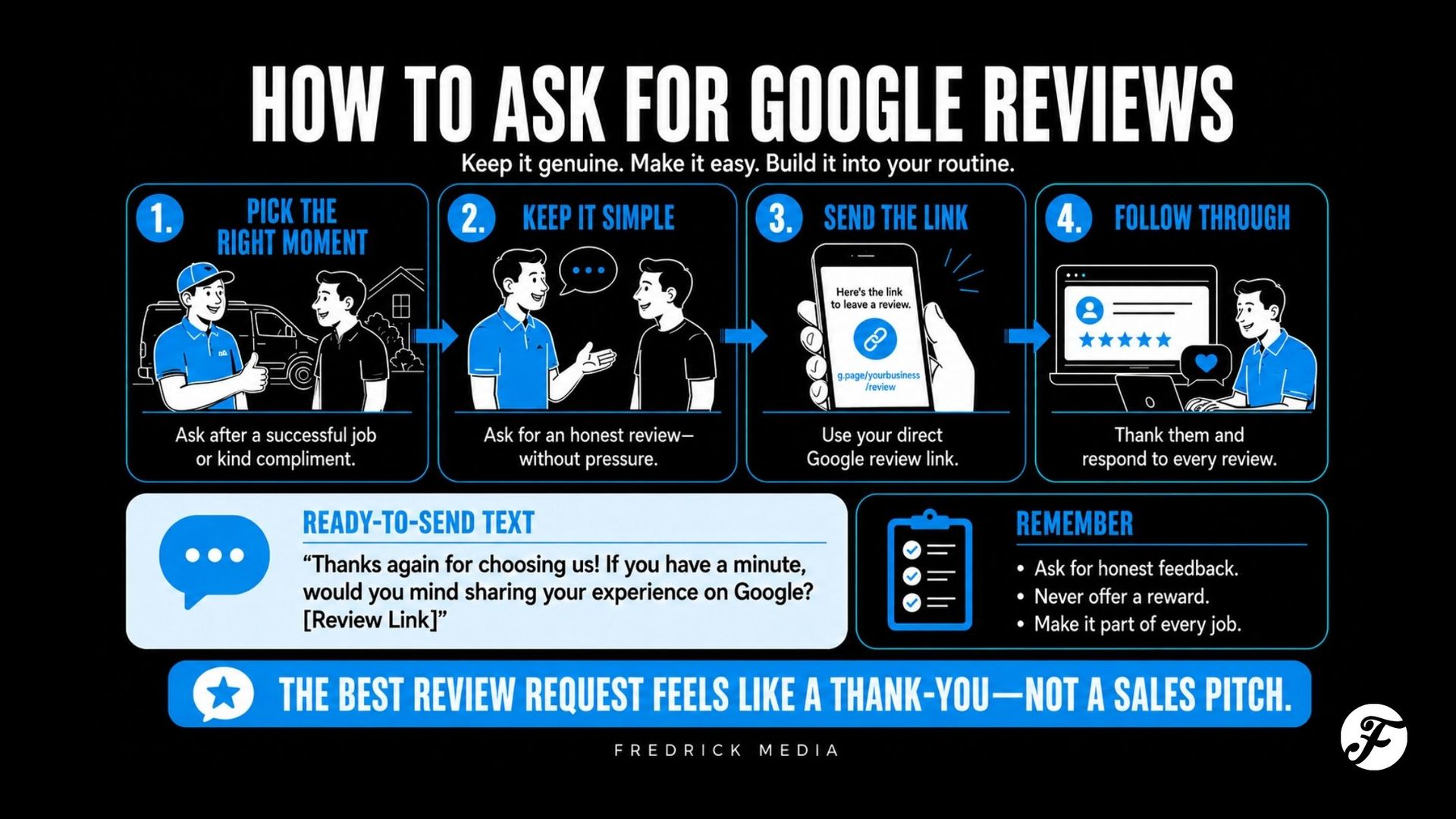
The easiest way to ask for a Google review is to make the request short, personal, and timely:
→ Thanks again for choosing [Business Name]. If you have a minute, would you be willing to share an honest Google review about your experience? It helps local customers know what to expect. Here’s the link: [Review Link]
Send it soon after the work is complete—ideally when the customer has just expressed satisfaction or thanked you. Ask for an honest review, not a five-star or positive review, and make it easy by including the direct Google review link.
You are not begging for praise. You are inviting a real customer to describe a real experience so future customers can make a better decision.
Reviews are only one part of local visibility. If your business is not showing up on Google Maps, first check whether the profile is verified, accurate, and eligible to appear. A stronger review process can build trust, but it cannot fix a missing or incorrectly configured Business Profile by itself.
The Simple Four-Part Review Request
An effective request usually needs only four things:
- A personal thank-you — Use the customer’s name and acknowledge the work
- A direct request — Ask whether they would share an honest review
- A reason — Explain briefly that reviews help local customers or your small business
- An easy link — Send the person directly to the review form
Avoid a long speech. The more explaining and apologizing you add, the more awkward the request can feel.
When Should You Ask a Customer for a Google Review?
Ask after the customer has experienced enough of the service to give an informed opinion, while the details are still fresh.
Good moments include:
- Right after a successful walkthrough
- After the customer says they are happy with the result
- When a final invoice is paid and the project is complete
- After an issue has been fully resolved and the customer confirms satisfaction
- When a repeat customer compliments the team
- In a thank-you email sent shortly after service
The best timing depends on the business.
| Business type | Practical time to ask |
|---|---|
| Emergency plumber | After the repair is complete and the customer confirms everything works |
| Roofer or remodeler | After the final walkthrough or completion conversation |
| Lawn or snow service | After several successful visits or at the end of a season |
| Land Surveyor | After documents are delivered and questions are answered |
| Custom builder | Near handoff, once the homeowner has experienced the completed process |
| Retail or walk-in service | On a receipt, follow-up message, or small QR-code sign after purchase |
Do not ask before the customer has received the service. A review should reflect a genuine experience.
How to Ask in Person Without Making It Weird
Keep the conversation natural. If the customer says, “Everything looks great,” you might say:
→ I’m glad to hear that. If you’re comfortable doing so, would you mind sharing that in an honest Google review? I can text you the link so it’s easy to find.
Then move on. Do not stand beside the customer while they write it. Google’s policy says businesses should not require or pressure people to leave a review while on the premises or request that specific content be included.
The goal is an invitation, not an obligation.
Google Review Request Text Message Examples
Replace the brackets and use the version that sounds most like your business.
Simple review request
→Hi [First Name], thanks again for choosing [Business Name]. If you have a minute, would you be willing to leave an honest Google review about your experience? It helps other local customers know what to expect. [Review Link]
After a completed project
→ Hi [First Name], it was a pleasure helping with your [project/service]. If you’re willing, we’d appreciate an honest Google review. Your feedback helps our small business and future customers. [Review Link]
After a customer gives a compliment
→ Thank you, [First Name]—I’m glad you’re happy with the work. If you’d be comfortable sharing that feedback on Google, here’s the direct link: [Review Link]. No pressure, and thank you again for trusting us.
Short version
→ Thanks for choosing [Business Name], [First Name]. Would you share an honest Google review about your experience? [Review Link]
Repeat-customer request
→ Hi [First Name], thank you for continuing to trust [Business Name]. We’ve appreciated working with you. If you haven’t reviewed us before, would you be willing to share an honest Google review? [Review Link]
Do not send every customer a robotic wall of text. A short mention of the actual service makes the message feel like customer care instead of a campaign.
Google Review Request Email Examples
Thank-you email
Subject: Thank you for choosing [Business Name]
Hi [First Name],
Thank you for trusting us with your [service or project]. We appreciate the opportunity to help.
If you have a minute, would you be willing to share an honest Google review about your experience? Your feedback helps local customers know what to expect and helps our small business continue to grow.
[Leave a Google Review]
Thank you again,
[Name]
[Business Name]
Very short email
Subject: Would you share your experience?
Hi [First Name],
Thanks again for choosing [Business Name]. If you’re willing, would you leave an honest Google review about your experience?
[Leave a Google Review]
We appreciate your time.
Project-specific email
Subject: Thank you for trusting us with your [project]
Hi [First Name],
It was a pleasure helping with your [specific project]. I hope you’re enjoying the finished result.
Honest customer feedback means a lot to a local business. If you have a minute, you can share your experience here:
[Leave a Google Review]
Thank you,
[Name]
The button should open the direct review form, not the homepage or a page that makes the customer search for the business again.
Should You Send a Review Reminder?
One polite reminder is usually reasonable. People forget, lose the first message, or intend to respond later.
Send the reminder several days after the original request:
→ Hi [First Name], just a quick follow-up in case my review link got buried. If you’d still like to share an honest Google review, you can do that here: [Review Link]. Either way, thank you again for choosing [Business Name].
If the customer does not respond, stop. Repeated messages can turn a positive experience into an irritating one.
How to Get Your Google Review Link or QR Code
Google provides a direct link and QR code for review requests.
On a computer:
- Sign in to the Google account that manages the Business Profile.
- Find your Business Profile on Google.
- Select Read Reviews.
- Select Get More Reviews.
- Copy the review link or download the QR code.
Google notes that the review QR code is currently generated through a computer browser rather than a mobile device.
Save the link somewhere your team can reach it quickly:
- A shared notes file
- Your estimate or invoicing system
- Email templates
- Text-message shortcuts
- A CRM follow-up workflow
- A printed card or leave-behind
Test the link in a signed-out or private browser before using it broadly. Confirm that it opens the correct business and makes the review process obvious.
This is also a good time to check the rest of the profile for accuracy. If your company travels to customers instead of serving them at a storefront, make sure your Google Business Profile service area reflects the cities and communities you genuinely serve. The review link should lead customers to a profile that accurately represents the business they hired.
Where to Put a Google Review Link or QR Code
Google suggests sharing the link or QR code in places such as thank-you emails, receipts, and the end of a chat interaction. A local service business could also use it in:
- A project-completion email
- A paid-in-full invoice message
- A leave-behind card
- A countertop sign at a real storefront
- A customer follow-up workflow
- A short post-service text message
Use the QR code where a customer is likely to have a phone in hand and enough time to act. Do not cover trucks, proposals, invoices, and every employee shirt with oversized review requests. Make the invitation visible without letting it overwhelm the customer experience.
Build a Review Process That Actually Gets Used
Most businesses do not lack happy customers. They lack a repeatable moment when someone remembers to ask.
Use this simple process:
Step 1: Choose the trigger
Decide what must happen before a request is sent: final walkthrough, completed service, paid invoice, delivered report, or another clear milestone.
Step 2: Assign responsibility
Name the person who sends the request. “Everyone should remember” usually means no one consistently does.
Step 3: Use one approved message
Start with a simple template, then personalize the first line or service detail. This keeps the request consistent without making it cold.
Step 4: Track the request—not the rating
Record whether the request was sent and whether a reminder is due. Do not create employee quotas for five-star reviews or pressure staff to obtain specific ratings.
Step 5: Respond to the review
Thank the customer when a review appears. Keep the response specific but avoid exposing private project, billing, legal, or health details.
A Simple Review-Request Workflow
| Stage | Action | Owner |
|---|---|---|
| Work completed | Confirm the customer has received the full service | Project lead |
| Customer satisfied | Ask briefly in person, when natural | Person speaking with customer |
| Same day or next day | Send personalized text or email with direct link | Office or owner |
| 5–7 days later | Send one polite reminder if appropriate | Office or owner |
| Review received | Post a brief, professional response | Profile manager |
| No review | Close the request; do not keep chasing | Profile manager |
Adjust the timing to your sales cycle. The important part is consistency and respect.
What Not to Do When Asking for Google Reviews
Do not offer a discount, gift, or entry in exchange for a Google review
Google prohibits incentives such as free or discounted goods or services in exchange for posting, changing, or removing a review. Even if you ask for an “honest” review, Google’s platform policy treats incentives as fake engagement.
The FTC also has rules and guidance addressing fake, false, paid, and improperly influenced reviews. The safest practical approach for Google reviews is simple: do not incentivize them.
Do not ask only the customers you expect to leave five stars
This is often called review gating. Do not send an internal satisfaction survey and route happy customers to Google while hiding the public review option from unhappy customers.
Google says merchants may not discourage negative reviews or selectively solicit positive ones. Build a neutral process around completed, genuine customer experiences.
Do not ask for a “five-star review”
Ask for honest feedback. Let the customer choose the rating and words.
Do not tell the customer what to write
You may make the process easy, but do not require the person to mention a city, employee, service, keyword, or specific claim. Google explicitly says merchants should not request that specific content be included.
Do not buy reviews
Do not purchase review packages, use AI-generated customer reviews, create accounts for fake reviewers, or ask someone who never used the business to post. Google requires reviews to reflect genuine experiences, and the FTC’s Consumer Review Rule addresses fake and false reviews.
Do not ask employees, relatives, or business partners to pose as ordinary customers
Personal and business relationships can create conflicts of interest. A review that hides a material connection can mislead customers.
Do not write the review for the customer
Helping someone locate the link is fine. Drafting the praise, taking control of the person’s phone, or telling them which rating to select crosses the line from invitation to manipulation.
What If You Are Worried About Getting a Negative Review?
A good review process does not mean ignoring customer problems. It means separating customer service from rating manipulation.
Give every customer a clear private way to raise concerns throughout the project. Fix what can be fixed. Train the team to notice dissatisfaction early. Then use a fair review-request process based on completed customer experiences—not a score that determines who is allowed to reach Google.
If a negative review arrives, respond calmly:
- Thank the person for the feedback
- Acknowledge the concern without arguing
- Avoid sharing private details
- Offer a direct way to continue the conversation
- Investigate the underlying process
- Report the review only if it violates platform policy, not simply because it is critical
An occasional thoughtful negative review can make the overall profile look more believable. Your response also shows future customers how the business handles a difficult situation.
Why Customers Do Not Leave Reviews
The reason is often simpler than you think:
- No one asked
- The request came weeks later
- The link was missing
- The message felt automated
- The customer had to search for the business
- The request was too long
- The customer meant to do it and forgot
Remove friction before assuming customers are unwilling.
Wisconsin Service-Business Example
Imagine a Fox Valley remodeler that completes three to five projects each month. The owner occasionally says, “If you get a chance, leave us a review,” during the final walkthrough.
Very few customers remember.
The company changes only three things:
- The final checklist includes a review-request step.
- The office sends a personal thank-you text with the direct link the next morning.
- One reminder is sent a week later.
The request is not more aggressive. It is simply consistent, timely, and easy.
That is the goal: make honest reviews a normal conclusion to good work.
FAQs
Is it okay to ask customers for Google reviews?
Yes. Google allows businesses to encourage reviews that reflect genuine customer experiences. Ask neutrally, include the direct link, and do not offer incentives or attempt to influence the rating or wording.
What should I say when asking for a Google review?
Thank the customer, ask for an honest review, explain briefly why it helps, and provide the direct link. For example: “Thanks again for choosing us. Would you be willing to share an honest Google review about your experience? Here’s the link.”
Can I ask for a five-star Google review?
Ask for an honest review instead. Requesting a specific rating can pressure the customer and influence the review. Let the customer decide the rating and content.
Can I offer a discount or prize for a Google review?
No. Google prohibits offering free or discounted goods, services, payment, or other incentives in exchange for a review. Keep the request voluntary and uncompensated.
Can I ask only happy customers to leave a Google review?
You don’t need to ask every customer, but avoid choosing people solely because you expect a positive review. The safest approach is to consistently invite customers with genuine, completed experiences and let them share honest feedback.
How many times should I ask for a review?
One initial request and one polite reminder are usually enough. If the customer does not respond, stop asking. A review is voluntary.
Should I use text or email for review requests?
Use the channel the customer already expects from your business. Text often works well for short, timely requests. Email provides more context and can fit an existing completion workflow. Either should include the direct review link.
Can several reviews arrive at once?
A healthy business may naturally receive several reviews, but avoid artificial campaigns that create unusual bursts or patterns. Build a steady process tied to real completed work rather than asking years of customers all at once.
Make Review Requests Part of Good Customer Care
You do not need a clever trick. You need a respectful process that makes it easy for real customers to share real experiences.
Fredrick Media helps Wisconsin service businesses improve their Google Business Profiles, create a practical review-request process, monitor feedback, and strengthen the local signals that help customers find and trust them.
Prefer a personal recommendation? Request a Local Visibility Review and I’ll help identify what deserves attention first.

About the Author
Joe Fredrick is the owner of Fredrick Media, a web design and local marketing company based in Neenah, Wisconsin. Since 2018, he has helped Wisconsin service businesses build stronger websites, improve their local visibility, and turn more online searches into real opportunities.
Is Your Website Pulling Its Weight?
Get a free website review with practical ideas to win more business.
Monthly Tips to Win More Local Work
Straightforward small business marketing advice sent to your inbox.
Contact Us
We will get back to you as soon as possible.
Please try again later.
SHARE THIS
Latest Resources