
What Is Good Web Design—and What Makes a Good Website?
By Joe Fredrick • September 10, 2026
11 Minute Read
Good web design makes it easy for the right customer to understand your business, trust what they see, find the information they need, and take the next step.
That sounds simple, but many websites miss it.
Some look impressive but leave visitors wondering what the company actually does. Others contain plenty of information, but the pages feel crowded, the navigation is confusing, or the contact form is difficult to use on a phone. A website can also look professional while doing very little to support search visibility or turn visitors into real inquiries.
For a small business, the best website is not necessarily the one with the fanciest effects. It is the one that helps customers choose.
The Short Answer: What Makes a Good Website?
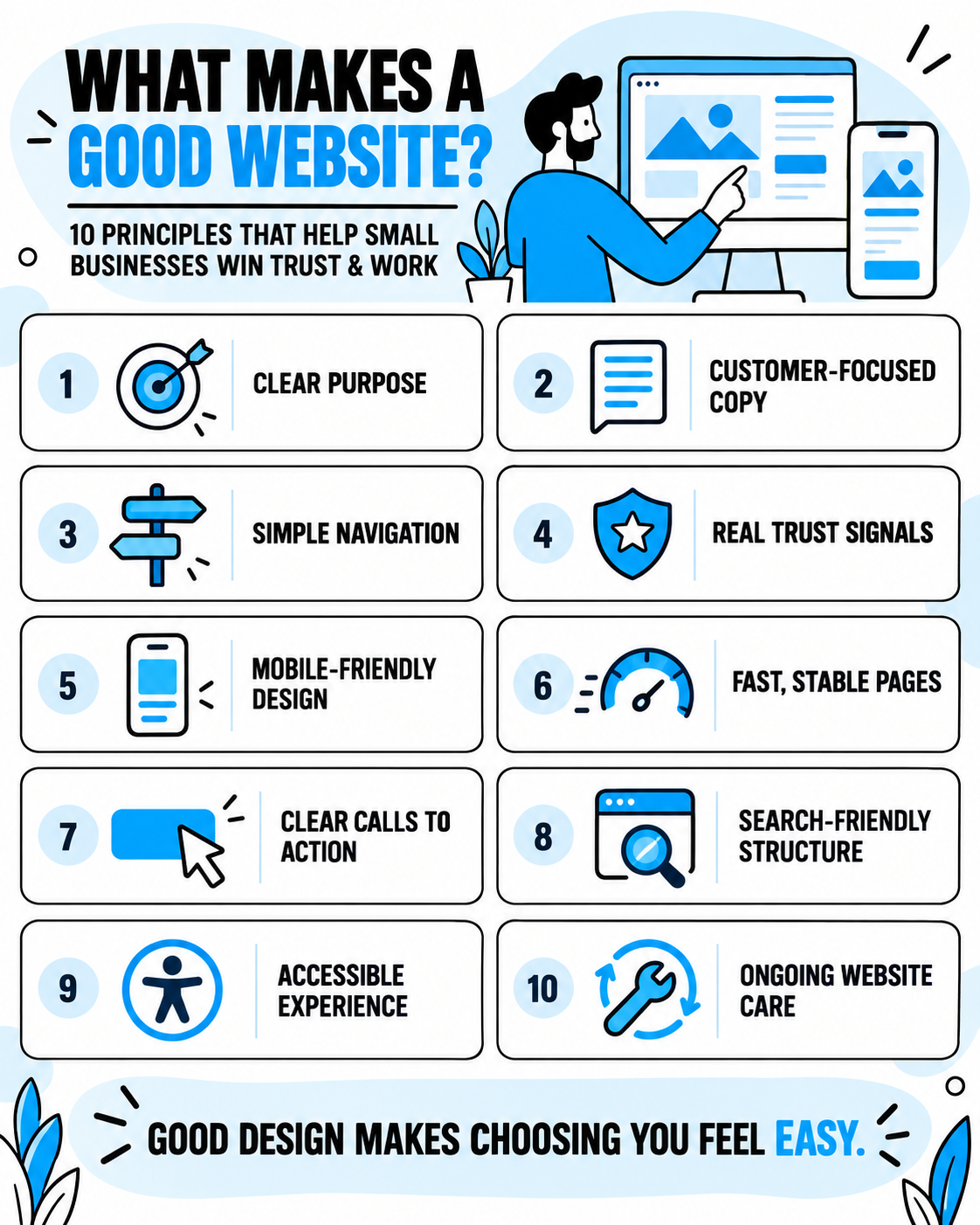
A good small business website should:
- Explain what the business does within a few seconds
- Speak to the customers the business wants to reach
- Work smoothly on phones, tablets, and computers
- Make important information easy to find
- Use clear, helpful copy instead of vague marketing language
- Show real proof that the business is trustworthy
- Load quickly and behave reliably
- Make calling, requesting a quote, or taking the next step feel easy
- Give search engines a clear understanding of each page
- Stay accurate, secure, and supported after launch
Good web design brings all of these pieces together. Color, typography, photography, and layout matter, but they should support the customer’s experience—not distract from it.
Good Web Design Starts With a Clear Job
Before choosing colors or arranging sections, decide what the website needs to accomplish.
For most service businesses, the website has several connected jobs:
- Help nearby customers discover the business.
- Confirm that the company provides the service they need.
- Show that the business is capable and trustworthy.
- Answer the questions customers ask before making contact.
- Turn interest into a phone call, estimate request, appointment, or visit.
Those goals should guide every design decision.
A contractor’s website may need to showcase completed work and make estimate requests easy. A land surveyor’s website may need to explain unfamiliar services in plain language. A local retailer may need to show its products, hours, location, and current promotions.
There is no single layout that is right for every business. There are, however, several principles that consistently make a website more useful.
1. Visitors Can Immediately Understand the Business
When someone lands on your homepage, they should not have to investigate what your company does.
The opening section should quickly answer:
- What do you offer?
- Who is it for?
- Where do you provide it?
- What should the visitor do next?
For example, “Welcome to Our Website” says almost nothing. “Residential Roofing and Siding in the Fox Valley” gives the visitor a useful answer immediately.
Clear does not mean boring. It means the creativity is built around the message instead of hiding it.
Quick test: Show your homepage to someone unfamiliar with your company for five seconds. Then ask what the business does, whom it serves, and what action they would take next. If those answers are unclear, the top of the page needs work.
2. The Design Fits the Business and Its Customers
A good website should feel like the business it represents.
The colors, type, images, layout, and tone should help create the right expectation. A custom home builder may need a spacious, image-led design that communicates craftsmanship. A family-focused service company may benefit from a warmer, approachable style. A technical professional may need a cleaner, more precise presentation.
This is one reason a generic template can fall short. It may look polished, but still feel as though any company name could be placed at the top.
Strong design creates consistency across:
- Logo use and brand colors
- Fonts and text sizes
- Buttons and calls to action
- Photography and graphics
- Spacing and page layouts
- Voice and written messaging
The goal is not to chase every new design trend. It is to make the real business feel recognizable, credible, and current.
3. The Website Is Easy to Navigate
Good navigation follows the visitor’s questions.
Most small-business visitors want to know what you do, whether you serve their area, why they should trust you, and how to contact you. The menu and page structure should make those answers easy to reach.
Use familiar labels such as Services, About, Projects, Reviews, and Contact. If you offer several important services, give visitors a clear way to reach each one. Avoid clever menu labels that force people to guess.
More pages are not automatically better. The right structure depends on the number of services, audiences, locations, and questions the website needs to cover. My guide to how many pages a small business website should have can help you decide how much room your content needs.
Quick test: Ask someone to find a specific service, your service area, and the estimate form without giving them instructions. If they hesitate or backtrack repeatedly, simplify the path.
4. The Copy Is Written for Customers
Design is not only what a website looks like. The words are part of the design too.
Clear website copy helps visitors scan a page, recognize the information that matters, and decide what to do. It should use descriptive headings, short paragraphs, useful lists, and plain language.
Weak website copy tends to focus on the company without connecting that information to the customer. Claims such as “quality service,” “industry leader,” or “we value our customers” sound positive, but they are difficult to evaluate without proof.
Stronger copy explains:
- The problems you solve
- The services you provide
- What makes your process useful or different
- Who is a good fit
- What customers can expect
- What happens after they contact you
Write like a knowledgeable person helping a customer—not like a brochure trying to impress everyone.
5. The Website Builds Trust With Real Proof
Potential customers often visit several websites before deciding whom to call. Your site should help them feel confident that your company is real, active, capable, and suited to the job.
Useful trust signals include:
- Genuine customer reviews
- Original photos of your work, team, equipment, shop, or office
- Relevant project examples or case studies
- Years of experience stated accurately
- Licenses, certifications, warranties, or professional memberships
- A clear service area and local contact information
- A straightforward explanation of your process
- A real About page with the people behind the business
Stock photography can support a design, but it should not replace the proof only your business can provide. A real project photo with a useful caption often says more than a perfect but generic image.
6. It Works Well on Mobile Devices
A mobile-friendly website is no longer an extra. Google uses the mobile version of a site’s content for indexing, and many local customers will first visit while holding a phone.
Responsive design should do more than shrink a desktop layout. On a phone, visitors should be able to:
- Read the text without zooming
- Open and use the menu comfortably
- Tap buttons without hitting the wrong item
- View images without awkward cropping
- Tap the phone number to call
- Complete forms without frustration
- Find the most important information without endless scrolling
Test the site on a real phone—not only inside a desktop preview. Pay particular attention to the header, menu, forms, galleries, popups, and sticky buttons.
7. Pages Load Quickly and Stay Stable
A visitor should not have to wait for oversized images, unnecessary animation, or a pile of scripts before using the page. Content should also stay in place while it loads instead of jumping around unexpectedly.
Google’s Core Web Vitals measure real-world loading performance, responsiveness, and visual stability. They are useful health indicators, but a perfect score does not guarantee high rankings. Performance is one part of a strong overall experience.
Common improvements include:
- Compressing and properly sizing images
- Avoiding unnecessary video backgrounds
- Limiting third-party scripts and tracking tools
- Loading nonessential content later
- Giving images and embedded elements set dimensions
- Using dependable hosting and a well-maintained platform
Check important pages with Google PageSpeed Insights, but interpret the findings practically. Fix the issues that affect real visitors instead of chasing a score with no business impact.
8. Calls to Action Make the Next Step Obvious
Do not make an interested customer search for a way to contact you.
A strong call to action tells the visitor what will happen next. “Request an Estimate,” “Schedule a Consultation,” or “Call for Availability” is clearer than “Submit” or “Click Here.”
Place calls to action where they make sense:
- In the header
- Near the top of important pages
- After explaining a service or benefit
- Near reviews or completed projects
- At the end of the page
The website does not need a button after every paragraph. It does need a consistent primary action that is easy to find.
Keep forms focused as well. Ask for the information you truly need to start a useful conversation. Every unnecessary field creates another reason not to finish.
9. The Website Has a Strong Search Foundation
Good design and search engine optimization should support each other.
A beautiful website cannot help someone who never finds it. At the same time, adding keywords to a confusing or untrustworthy page will not create a good customer experience.
A sound on-page SEO foundation includes:
- A clear purpose for each important page
- Descriptive page titles and meta descriptions
- One useful main heading with organized subheadings
- Original content that answers real customer questions
- Separate pages for important services when appropriate
- Natural service-area language for local businesses
- Descriptive URLs
- Helpful internal links
- Accurate image alt text
- Crawlable pages, working links, and sensible redirects
- Connection to Google Search Console and analytics
Google recommends creating helpful, people-first content and using the language people would naturally use to find it. That is a better long-term strategy than repeating a keyword until the page feels awkward.
A strong technical setup gives useful content a better place to live. It doesn't replace relevance, competition, authority, reviews, or ongoing marketing.
10. The Website Is Accessible, Accurate, and Maintained
A website is not finished forever on launch day.
Services change. Employees come and go. Phone numbers, hours, service areas, offers, and project photos need updates. Forms can stop delivering correctly, and links can break as other pages move.
Regular website care should include:
- Testing forms and phone links
- Checking for broken links
- Updating outdated business information
- Adding recent reviews and project photos
- Reviewing mobile layouts after major changes
- Keeping the platform, security, and integrations supported
- Checking traffic, inquiries, and search performance
- Improving pages as customer questions become clearer
Accessibility should be part of that ongoing attention. Use readable text, sufficient color contrast, descriptive alternatives for meaningful images, clear form labels, and controls that can be used without relying only on a mouse.
A maintained website sends a quiet but important message: this business is active and paying attention.
Good Web Design Is More Than Looking Professional
| Area | What it should accomplish |
|---|---|
| Strategy | Give the website a clear business purpose |
| Messaging | Help visitors understand the offer quickly |
| Structure | Make important answers easy to find |
| Visual design | Reflect the quality and personality of the business |
| Trust | Support claims with real proof |
| Mobile experience | Make every important action comfortable on a phone |
| Performance | Load and respond without unnecessary delay |
| Conversion | Guide interested visitors toward a clear next step |
| SEO foundation | Help search engines understand and discover useful pages |
| Care | Keep the website accurate, secure, and working over time |
When these pieces work together, the website becomes more than an online brochure. It becomes a dependable part of how the business gets found, earns trust, and wins work.
A 10-Minute Good Website Checklist
Open your homepage on a phone and answer each question honestly:
If you answered no once or twice, a few focused updates may be enough. If several answers are no—especially across clarity, mobile use, trust, and structure—the website may need a more complete refresh or redesign.
The guide on whether to update or completely redesign your website will help you choose the right level of work.
Frequently Asked Questions About Good Web Design
What is the most important part of good web design?
Clarity is the best starting point. Visitors should quickly understand what the business offers, why they should trust it, and what to do next. Attractive visuals, search optimization, and advanced features have limited value if the basic message is confusing.
What are the basic principles of good website design?
The core principles include a clear purpose, customer-focused content, simple navigation, consistent visual design, mobile usability, fast and stable pages, accessible content, genuine trust signals, visible calls to action, and a sound SEO foundation.
Does a good-looking website rank higher on Google?
Not simply because it looks good. Google considers relevance, helpful content, links, local and topical authority, technical accessibility, page experience, and many other signals. Good design can support search performance by making the site easier to use, navigate, maintain, and understand, but visual quality alone does not guarantee rankings.
How often should a small business website be redesigned?
There is no required schedule. Redesign when the website no longer reflects the business, works poorly on mobile, creates confusion, looks noticeably untrustworthy, limits search growth, or has become difficult to maintain. A well-built site can often last for years with thoughtful updates.
Can a one-page website have good web design?
Yes. A one-page website can work well for a new or simple business with one main service category and a focused goal. Businesses with several services, locations, audiences, or search goals usually benefit from a multi-page structure. Compare the options in this guide to one-page vs. multi-page websites.
How do I know whether my website is effective?
Look beyond appearance. Test forms and phone links, review mobile usability, track qualified inquiries, study which pages and searches bring visitors, and ask recent customers what they needed to know before contacting you. An effective website helps the right people take a useful next step.
Your Website Should Make Choosing You Feel Easy
Your website does not need every trendy feature. It needs a clear plan, useful content, credible proof, thoughtful design, and a dependable way for customers to take action.
If your current site feels unclear, outdated, difficult to use, or disconnected from the business you run today, I can help you determine what is worth keeping and what needs to change.
Fredrick Media creates custom, mobile-friendly websites for Wisconsin contractors, service businesses, and other hardworking small-business owners. You work directly with me from the first conversation through launch, with the strategy, copywriting, design, local SEO foundation, and ongoing support handled for you.
Explore small business web design and pricing, or request a free website review for practical feedback on your current site.
Helpful Resources

About the Author
Joe Fredrick is the owner of Fredrick Media, a web design and local marketing company based in Neenah, Wisconsin. Since 2018, he has helped Wisconsin service businesses build stronger websites, improve their local visibility, and turn more online searches into real opportunities.
Is Your Website Pulling Its Weight?
Get a free website review with practical ideas to win more business.
Monthly Tips to Win More Local Work
Straightforward small business marketing advice sent to your inbox.
Contact Us
We will get back to you as soon as possible.
Please try again later.
SHARE THIS
Latest Resources